
Check your MEPCO bill online by visiting mepcobilloc.com.pk. This free service allows you to easily view your latest bill details, including the amount and due date. You can also access the full bill, download a copy, or print it for payment. Simply enter your 14-digit reference number or 10-digit customer ID below to retrieve your MEPCO electricity bill. The service is available in English for your convenience.
Search Your Electricity Bill
To view your Mepco bill online, all you need is your 14-digit reference number. Alternatively, you can also check your bill using a 10-digit customer ID or consumer ID. If you’re unsure where to locate these details, refer to the red highlighted section in the image below.
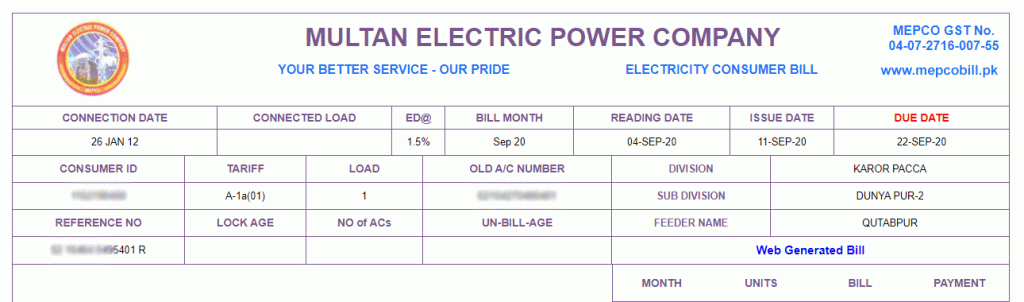
If you’re trying to find Mepco MIS or visiting mepco.gov.pk to get a duplicate bill, simply enter your reference number or customer ID in the provided field above to check your bill amount. Mepcobill.pk is a user-friendly platform that makes it easy to access Mepco utility bills.
About Mepco
MEPCO stands for Multan Electric Power Company. It is a public limited company that was established on May 14, 1998. MEPCO is responsible for distributing electricity in Multan and the surrounding regions of South Punjab, Pakistan.
Mepco Covers These Areas
The Multan Electric Supply Company is responsible for supplying electricity and managing maintenance services in the following cities.
| Bahawalnagar | Multan | Vehari |
| Khanewal | Dera Ghazi Khan | Bhawalpur |
| Rajanpur | Lodhran | Sahiwal |
| Layyah | Muzaffargarh | Pakpattan |
| Rahim Yar Khan |

If you need to check your electricity bill for Multan (bijli bill) or any other city mentioned in the table above, you’re in the right place. Simply enter your bill reference number or consumer ID to instantly view your latest MEPCO bill.
Bill Information
On mepcobilloc.com.pk, you can easily check your bill amount and its due date. You can also view the full bill, which shows details like the meter reading date, bill issue date, and the amount to pay after the due date, including any extra charges. To see if your bill is paid, you can only check the status for the previous month’s bills. By viewing the full bill, you can access your bill payment history for the last 12 months, showing the amounts that have been paid.
Mepco Peak Hours
MEPCO advises reducing electricity usage during peak hours to lower your bills and help stabilize the regional power supply. The recommended peak hours are given below.
| December to February | 5:00 PM – 9:00 PM |
| March to May | 6:00 PM – 10:00 PM |
| June to August | 7:00 PM – 11:00 PM |
| September to November | 6:00 PM – 10:00 PM |
How To Check Mepco Bill?
To check your MEPCO bill online, follow these steps:
- Visit the Mepcobilloc.com.pk website.
- You have to enter the 14-digit reference number or 10-digit customer ID.
- Now you will get the latest bill amount with a due date.
- Click ‘View Full Bill’ to view the full bill or download a copy of the bill.
Mepcobilloc.com.pk is a user-friendly website optimized for both desktop and mobile devices, enabling you to easily access your bill information. To retrieve your MEPCO bill online, simply enter your 14-digit reference number, which is present on any previous bill. Please be aware that it is not possible to check your bill using your CNIC or name.
MEPCO Bill Email Service
Mepcobilloc.com.pk provides a user-friendly service that enables you to receive your monthly MEPCO bills directly via email. By subscribing with your email address and reference number, you’ll get your bill each month before the due date. If you prefer SMS notifications for your bills, this service is highly recommended.
Mepco Bill SMS Service
MEPCO offers a convenient SMS service that allows customers to receive their electricity bill information directly on their mobile phone. To subscribe, simply type ‘pitc’ followed by a space and your 14-digit reference number, then send it to 8334. This service ensures that you receive your bill details instantly every month.
New Connection or Transfer Procedure
If you have purchased a property with an existing MEPCO connection registered in the name of the previous owner and need to update it, you will need to follow the procedure to apply for a new connection. To request a name change or correction, visit the nearest MEPCO office and submit your application.
Taxes in Mepco Bill
Here is a list of common taxes you usually see in MEPCO bills.
FPA
FPA, or fuel price adjustment, refers to the difference in fuel costs on MEPCO bills. This charge is tied to the fuel costs of rental power companies that generate electricity from crude oil and other sources. It appears on your bill when fuel prices fluctuate.
TR Surcharge
T.R, or Tariff Rationalization Surcharge, represents the difference between the NEPRA and GOP tariffs. If the difference is positive, the government meets it as a subsidy. However, if the difference is negative, the distribution company pays the government an amount under Inter-Disco Tariff Rationalization Surcharge (IDTR SUR).
FC Surcharge
FC stands for Financing Cost. To ensure the recovery of the loan of Power Holding Private Limited, the authorities have set an FC surcharge of 43 paisa per unit.
Deferred Amount
This bill amount can be paid either in the current month or in a future month. There are no late payment charges on a deferred bill, and future bills can include the amount either in full or in installments.
QTR Tariff Adj/DMC
This is a quarterly tariff adjustment charge, which may appear on your bill every three months.
If you want to calculate an estimated bill amount, you can use the Mapco bill calculator here.